

Video Conferencing Software
Onetime(Perpetual License)
About
Communication applications help businesses communicate by providing messaging, video conferencing, and VoIP capabilities. These apps allow businesses to connect with customers and employees alike, making it easy to stay in touch no matter where you are.
Key Features
- ✓ Auto Framing
- ✓ Automated Transcripts
- ✓ Guest users
- ✓ Notification Blocker
- ✓ Participant Permissions
- ✓ Hand Raising
- ✓ Meeting Scheduler
- ✓ Audio Conferencing
- ✓ Switch Presenter
- ✓ Live Preview
- ✓ Virtual Whiteboard
- ✓ HD Video Streaming
- ✓ Annotation and Markup Tools
- ✓ File Sharing
- ✓ Session Recording
- ✓ Remote Control
- ✓ Screen Sharing
- ✓ Polls (Voting)
- ✓ Live Chat
Screenshots
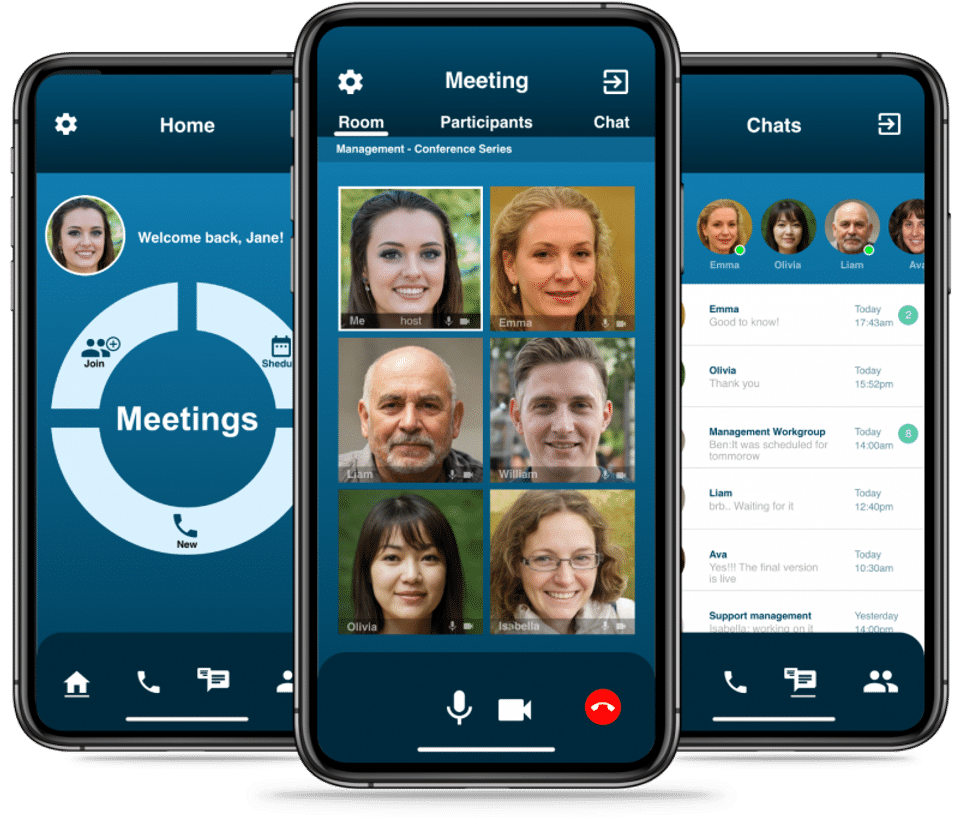
Screenshot 1
Pricing
EntComm
USD
0
- Frustration-free online meetings
- Seamless switch
- Easy sharing Screen
- Notifications
- Scheduled Meeting
- 1 click to enter call/meeting
- High quality noise-cancelled audio
- Call Recording
- Chat Rooms
- Amazon security
- Pay only for what you use
- Integration with active directory
- Dedicated and Branded Applications
- Frustration-free online meetings
- Seamless switch
- Easy sharing Screen
- Notifications
- Scheduled Meeting
- 1 click to enter call/meeting
- High quality noise-cancelled audio
- Call Recording
- Chat Rooms
- Amazo
User Reviews
+ Write a Review
No reviews yet. Be the first to review!
Frequently Asked Questions
How much does EntComm cost?
▼
EntComm offers 1 pricing plan(s):
- EntComm — USD0.00
What is EntComm used for?
▼
EntComm is a Video Conferencing Software solution. Top features include:
- Auto Framing
- Automated Transcripts
- Guest users
- Notification Blocker
- Participant Permissions
Does EntComm offer a free trial?
▼
EntComm does not currently offer a free trial.
What support does EntComm provide?
▼
EntComm provides Online (Ticket) support.
Is EntComm cloud-based or on-premise?
▼
EntComm is Cloud Hosted software.
What training resources does EntComm offer?
▼
EntComm provides Help Guides,Blogs,Video Guides for training.
.jpg)


