.png)
Free Cam

Screen recording and video editing software
What is Free Cam?
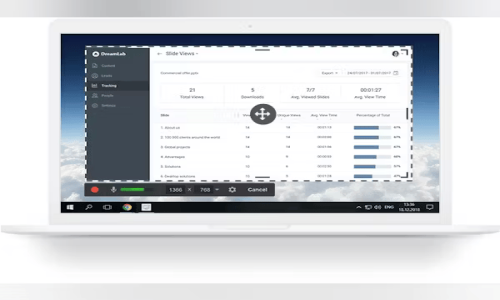
Free Cam is a user-friendly screen recording and video editing tool developed by the U.S.-based company iSpring Solutions. It’s designed to help users create high-quality screencasts and tutorials with ease. Whether you're recording your full screen, a specific app window, or just a custom area, Free Cam lets you capture both system audio and your microphone input. It also comes with built-in editing features like trimming clips, removing background noise, and adjusting audio levels. With no time limits, ads, or watermarks, it’s a great solution for teachers, trainers, and professionals here in the U.S. looking to produce and share HD video content—especially with direct YouTube upload support.
What is Free Cam?
-
Developed by iSpring Solutions, based in Virginia, USA
-
Easy-to-use screen recording and video editing software
-
Records full screen, specific windows, or custom areas
-
Captures system audio and microphone input
-
Built-in editor for trimming, background noise removal, and audio enhancements
-
Exports HD-quality videos (up to 720p)
-
Allows direct YouTube uploads
-
Ideal for beginners and professionals alike
Why Choose Free Cam?
-
No time limits, watermarks, or ads
-
Simultaneous recording of system sound and microphone
-
Built-in video editor for quick edits
-
HD video export with direct YouTube upload
-
Great for tutorials, walkthroughs, and training videos
-
Clean, beginner-friendly interface
-
Runs smoothly on standard U.S. desktops and laptops
Benefits of Free Cam
-
High-Quality Output: Produces sharp HD recordings
-
No Watermarks or Ads: Clean content, ready to publish
-
Audio Editing Tools: Easily enhance or clean up voice recordings
-
Custom Recording Area: Focus on just what you need
-
Direct Upload to YouTube: Publish videos without leaving the app
-
Lightweight and Fast: Doesn’t slow down your system
-
Time-Saving Workflow: Record and edit in one place
How to Use Free Cam
-
Download and install the software from the official website
-
Open the app and select “New Recording”
-
Choose full screen, window, or custom recording area
-
Select audio input (system, microphone, or both)
-
Click record and begin your screencast
-
Stop recording and edit within the same app
-
Save your video in WMV format or upload directly to YouTube
Features of Free Cam
-
Full-screen and area-specific screen recording
-
System audio and microphone capture
-
Trim and delete unwanted video sections
-
Remove background noise from audio
-
Add fade-in/out audio effects and normalize sound
-
Export HD videos (up to 720p resolution)
-
Direct upload to YouTube
-
Clean, user-friendly interface with minimal learning curve
What Makes Free Cam Different?
-
No watermarks, time limits, or ads—even in the standard version
-
Built-in video editor eliminates need for external tools
-
Fast exporting and direct publishing to YouTube
-
Designed for simplicity without sacrificing core features
-
Optimized for low to mid-range system performance
-
Clear audio with basic enhancement options
-
Great all-in-one tool for screen recording and editing
Who Can Benefit from Free Cam?
-
Educators creating online lessons or tutorials
-
Corporate trainers making internal training content
-
YouTubers recording how-to videos or reviews
-
Students capturing lectures or creating presentations
-
Software developers demoing products or tools
-
Freelancers and consultants making client walkthroughs
-
Anyone in the U.S. needing simple, reliable screen recording
Is Free Cam Easy to Use?
-
Simple installation and setup process
-
Intuitive, minimal interface for fast navigation
-
Easy-to-use controls for recording and editing
-
Ideal for beginners but powerful enough for advanced users
-
Built-in help guides make learning quick
-
Requires no previous video editing experience
-
Perfect for professional or casual use
What Support Does Free Cam Offer?
-
Online documentation and how-to video tutorials
-
Helpful FAQs and troubleshooting guides
-
Community-based support and discussion forums
-
Easy-to-follow help materials for new users
-
Stable and low-maintenance software
-
Limited direct support, but rarely needed due to simplicity
- ✓ Real-time Chat
- ✓ HD Video Streaming
- ✓ Screen Sharing
Contact us to get detailed pricing as per your requirements.
No reviews yet. Be the first to review!
Free Cam is a Video Conferencing Software solution. Top features include:
- Real-time Chat
- HD Video Streaming
- Screen Sharing
Yes, Free Cam offers a 7-day free trial.
Free Cam provides Email,Online (Ticket) support.
Free Cam is Cloud Hosted software.
Free Cam provides Help Guides for training.
.jpg)


