
- ✓ Multi-Location Scheduling
- ✓ Resource Scheduling
- ✓ Reservations
- ✓ Payment Processing
- ✓ Online Scheduling
- ✓ Meeting Room Booking
- ✓ Group Scheduling
- ✓ Employee Scheduling
- ✓ Class Scheduling
- ✓ Calendar Management
- ✓ Automated Scheduling
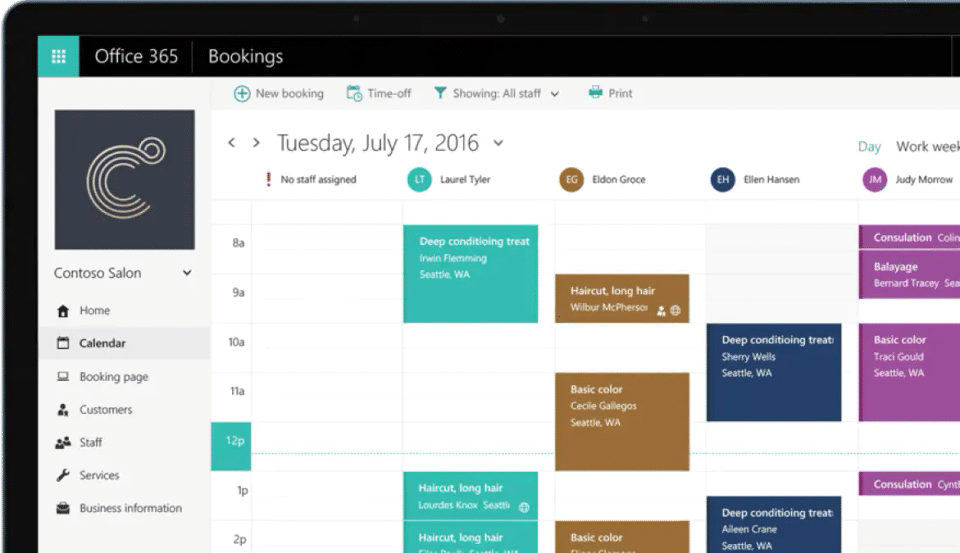
- ✓ Appointment Scheduling
- Perfect for up to 6 people
- Up to 6TB of cloud storage
- that's 1TB per person
- Premium safety features in mobile app
- Microsoft Family Safety mobile app - Premium
- Outlook - Premium
- Works on Windows
- macOS
- iOS and Android
- Advanced security for email and files
- Ongoing technical support
- Perfect for up to 6 people
- Up to 6TB of cloud storage
- that's 1TB per person
- Premium safety features in mobile app
- Microsoft Family Safety mobile app - Premium
- Outlook - Premium
- Works on Windows
- macOS
- iOS and Andr
- 1 person
- 1 TB of storage
- Outlook - Premium
- Works on Windows
- macOS
- iOS and Android
- Advanced security for email and files
- Ongoing technical support
- 1 person
- 1 TB of storage
- Outlook - Premium
- Works on Windows
- macOS
- iOS and Android
- Advanced security for email and files
- Ongoing technical support
- Usage - 1 PC or Mac
- Word
- Excel
- PowerPoint
- OneNote - Classic
- One-time purchase for one PC or Mac
- Classic 2021 versions of Word
- Excel
- PowerPoint and Outlook
- Microsoft support included for first 60 days at no extra cost
- Usage - 1 PC or Mac
- Word
- Excel
- PowerPoint
- OneNote - Classic
- One-time purchase for one PC or Mac
- Classic 2021 versions of Word
- Excel
- PowerPoint and Outlook
- Microsoft support included for first 60 days at no extra cost
- Chat
- call
- meet up to 300 attendees
- Web and mobile versions of Office apps
- 1 TB of cloud storage
- Business-class email
- Standard security
- Anytime phone and web support
- Microsoft word
- Microsoft excel
- Microsoft powerpoint
- Microsoft Teams
- Microsoft outlook
- Microsoft exchange
- Microsoft OneDrive
- Microsoft SharePoint
- Chat
- call
- meet up to 300 attendees
- Web and mobile versions of Office apps
- 1 TB of cloud storage
- Business-class email
- Standard security
- Anytime phone and web support
- Microsoft word
- Micros
- Everything in Business Basic
- plus:
- Desktop versions of Office apps with premium features
- Easily host webinars
- Attendee registration and reporting tools
- Manage customer appointments
- Microsoft word
- Microsoft excel
- Microsoft powerpoint
- MicrosoftTeams
- Microsoft outlook
- Microsoft exchange
- MicrosoftOneDrive
- Microsoft SharePoint
- Microsoft Access (PC only)
- MicrosoftPublisher (PC only)
- Everything in Business Basic
- plus:
- Desktop versions of Office apps with premium features
- Easily host webinars
- Attendee
- Everything in Business Standard
- plus:
- Advanced security
- Access and data control
- Cyberthreat protection
- Microsoft word
- Microsoft excel
- Microsoft powerpoint
- MicrosoftTeams
- Microsoft outlook
- Microsoft exchange
- MicrosoftOneDrive
- Microsoft SharePoint
- Microsoft access (PC only)
- MicrosoftPublisher (PC only)
- MicrosoftIntune
- MicrosoftAzure Information Protection
- Everything in Business Standard
- plus:
- Advanced security
- Access and data control
- Cyberthreat protection
- Microsoft word
- Microsoft excel
- Microsof
- Desktop versions of Office apps with premium features
- 1 TB of cloud storage
- Standard security
- Anytime phone and web support
- Microsoft word
- Microsoft excel
- Microsoft powerpoint
- Microsoft outlook
- MicrosoftOneDrive
- Microsoft access (PC only)
- MicrosoftPublisher (PC only)
- Desktop versions of Office apps with premium features
- 1 TB of cloud storage
- Standard security
- Anytime phone and web support
- Microsoft word
- Microsoft excel
- Microsoft powerpoint
- Microsoft outlook
- MicrosoftOneDrive
- Microsoft access (PC
What do you like best? It wasn't very hard to figure out. Very fast processor and good for booking hair appointments. What do you dislike? It's not very practical for me to have in on my laptop. If I would have a tablet or if it was available on ...
What do you like best? The tool integrates with Outlook 365 calendars, so everyone with an E3 license can be added to the bookings tool. Once we figured out how to exclude certain user names from appearing on the list (as unbookable), we like it be...
What do you like best? It's functional, it works for basic scheduling. What do you dislike? Embedding hardly works, it doesn't give a ton of customization when sending to a custom landing page and is difficult to use with a website. ...
What do you like best? I use a variety of programs that require the use of Microsoft products, especially Microsoft Outlook. The Microsoft Bookings software is very compatible with Outlook and I can send appointment requests to other Outlook users. W...
What do you like best? This program is easy to setup and easy to use. Great for organizing personal and customer related engagements. Great customer support as well. What do you dislike? Not many complaints about this program. Can be diffi...
Microsoft Bookings offers 7 pricing plan(s):
- Microsoft 365 Family (For Home) — USD0.00 ₹ 6,199.00/year
- Microsoft 365 Personal (Home) — USD0.00 ₹ 4,899.00/year
- Office Home & Business 2021 — USD0.00 ₹ 9,199.00 (One-time purchase)
- Microsoft 365 Business Basic — USD0.00 ₹ 125.00 user/month
- Microsoft 365 Business Standard — USD0.00 ₹ 660.00 user/month
- Microsoft 365 Business Premium — USD0.00 ₹ 1,440.00 user/month
- Microsoft 365 Apps — USD0.00 ₹ 595.00 user/month
Microsoft Bookings is a Appointment Scheduling Software solution. Top features include:
- Multi-Location Scheduling
- Resource Scheduling
- Reservations
- Payment Processing
- Online Scheduling
Microsoft Bookings does not currently offer a free trial.
Microsoft Bookings provides Online (Ticket) support.
Microsoft Bookings is Cloud Hosted software.
Microsoft Bookings provides Help Guides,Blogs,Video Guides for training.


