
SolarWinds Patch Manager

Bring IT all together.
What is SolarWinds Patch Manager?
SolarWinds Patch Manager is an automated patch management software designed to simplify and centralize the process of keeping systems and applications up-to-date. It aims to reduce security risks, improve system stability, and help organizations maintain compliance by efficiently deploying patches for both Microsoft products and a wide range of third-party applications. It works by extending the capabilities of existing Microsoft WSUS (Windows Server Update Services) and SCCM (System Center Configuration Manager) deployments.
Why Choose SolarWinds Patch Manager?
Choosing SolarWinds Patch Manager offers several compelling reasons:
- Extended Patching Capabilities: It goes beyond the native capabilities of WSUS and SCCM, allowing for more granular control over patch deployments, especially for third-party applications.
- Centralized Management: Provides a single, unified console for managing patches across a diverse IT environment, including physical servers, virtual machines, and remote desktops.
- Automation: Automates many steps in the patch management process, from research and scheduling to deployment and reporting, saving IT teams significant time and effort.
- Comprehensive Third-Party Support: Offers pre-built and pre-tested packages for common third-party applications (like Adobe, Java, Apple, Google, Mozilla), eliminating the need for manual scripting and testing.
- Enhanced Security: By ensuring timely updates, it helps to proactively address software vulnerabilities and protect against potential security breaches.
- Compliance Reporting: Simplifies compliance efforts with robust, customizable reporting options that demonstrate patch status and compliance to auditors.
- Reduced Manual Errors: Automation minimizes human error associated with manual patching, ensuring consistency and accuracy.
- Scalability: Designed to manage patches across large networks and virtual environments, making it suitable for organizations of various sizes.
- Integration with Orion Platform: Integrates seamlessly with other SolarWinds products on the Orion Platform, providing a centralized view and correlated data across your IT stack.
Benefits of SolarWinds Patch Manager
The benefits of implementing SolarWinds Patch Manager include:
- Reduced Vulnerabilities: Proactively addresses known software vulnerabilities, significantly improving the overall security posture of your IT infrastructure.
- Improved System Stability and Performance: Keeps systems and applications updated with bug fixes and performance enhancements, leading to greater stability and smoother operations.
- Time and Cost Savings: Automates labor-intensive tasks, freeing up IT staff to focus on more strategic initiatives and reducing the manual effort (and associated costs) of patching.
- Simplified Compliance: Provides detailed, customizable reports that easily demonstrate patch compliance for audits and internal stakeholders.
- Centralized Control and Visibility: Offers a unified interface to view patch status, identify missing patches, and control deployments across all managed systems.
- Efficient Third-Party Patching: Streamlines the patching of non-Microsoft applications, which is often a complex and time-consuming task with native tools.
- Flexible Deployment Options: Allows for advanced scheduling, pre- and post-deployment actions (using PackageBoot™ technology), and the ability to patch offline machines using Wake-on-LAN.
- Customization: Enables the creation of custom update packages for unique or in-house applications.
How to Use SolarWinds Patch Manager?
Using SolarWinds Patch Manager generally involves these steps:
-
Installation and Setup:
- Install Patch Manager on a system, often alongside an existing Microsoft WSUS or SCCM environment.
- Configure the environment by adding your WSUS server to Patch Manager.
- Set up credential rings to map user credentials to managed systems.
- Generate a software publishing certificate to enable publishing of third-party and custom updates.
- (Optional) Configure group policies to enable third-party updates if your organization uses them.
- (Optional) Integrate with the SolarWinds Orion Platform for a consolidated monitoring view.
-
Downloading and Selecting Updates:
- Run the Update Configuration wizard to synchronize with SolarWinds' Third-Party Updates Pack website.
- Synchronize your WSUS server with the Microsoft Updates website to retrieve Microsoft updates.
- Select the desired third-party and Microsoft updates from vendor catalogs.
-
Generating Inventory:
- Generate an inventory of your WSUS server and managed systems to determine their current patch status. This populates reports and dashboards.
-
Approving and Publishing Updates:
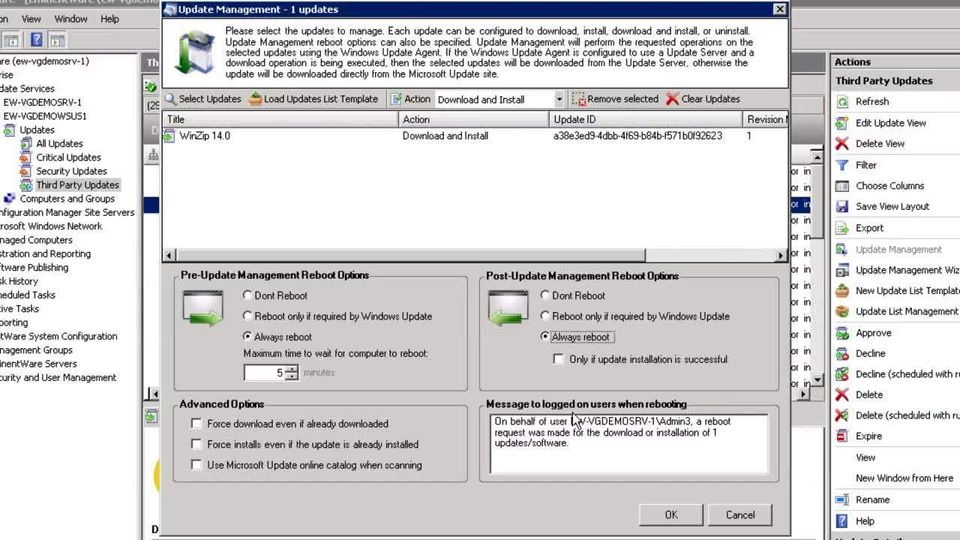
- Download the selected third-party update packages to your WSUS server.
- Approve the updates you want to publish.
-
Deploying Patches:
- Push the approved updates to your managed systems.
- Schedule deployments for specific times (e.g., off-peak hours, monthly, weekly) or force immediate updates.
- Utilize features like Wake-on-LAN to patch offline machines.
- Use PackageBoot™ technology for complex patches that require pre- or post-installation scripts.
-
Monitoring and Reporting:
- Utilize the Patch Status Dashboard for a quick overview of missing updates, system health, and installed patches.
- Generate comprehensive and customizable reports on patch status, compliance, installation errors, and more.
- Review task history to verify successful deployments.
Features of SolarWinds Patch Manager
Key features of SolarWinds Patch Manager include:
- Microsoft WSUS Patch Management: Centralized management of Microsoft updates, extending WSUS capabilities with enhanced scheduling, reporting, and control.
- Third-Party Application Patching: Supports patching for a wide range of popular third-party applications (e.g., Adobe, Java, Firefox, Chrome, Apple, Oracle, Mozilla) with pre-built and pre-tested packages.
- SCCM Integration: Extends Microsoft SCCM deployments to provide robust management of non-Microsoft updates and allows for viewing of third-party patch details.
- Patch Compliance Reports: Provides detailed and customizable reports to demonstrate patch status and compliance to auditors and internal stakeholders.
- Patch Status Dashboard: An intuitive, color-coded dashboard that offers a quick glance at security updates, missing patches, and overall environment health.
- Automated Patch Deployment: Automates the entire patching process, from scanning and identification to deployment and verification.
- Pre-built/Pre-tested Packages: Offers a library of pre-tested packages for common third-party applications, reducing the need for manual research, scripting, and testing.
- Custom Package Wizard: Allows users to create custom update packages for any MSI, MSP, or EXE without complex scripting, enabling deployment of in-house or specialized applications.
- Advanced Before-and-After Package Deployment Actions (PackageBoot™): Enables the creation of pre- and post-installation scenarios for complex patches to ensure successful deployment.
- Virtual Machine Patching: Simplifies patch management for virtual desktops and servers, including the ability to patch offline machines and organize virtual machines into groups.
- Remote Software Deployment Tools: Facilitates the remote deployment of software and patches.
- Wake-on-LAN (WoL): Can wake up sleeping or shut-down devices to apply patches, improving patch success rates.
- Computer Inventory Management: Provides comprehensive hardware and software inventory capabilities.
- Role-Based Access Control: Offers granular control over user permissions for managing patches.
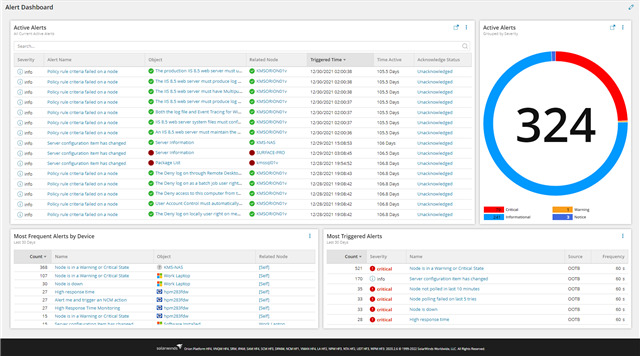
- Alerting and Notification System: Sends alerts and notifications about patch status and issues.
- ✓ Alerts/Notifications
- ✓ Dashboard
- ✓ Compliance Management
- ✓ Patch Testing
- ✓ Automatic Patch Deployment
- ✓ Patch Prioritization
- ✓ Customization





Contact us to get detailed pricing as per your requirements.
What do you like best? The price was at a good point and the patching details was informational What do you dislike? The complexity of the setup and daily use was too much for our needs. Recommendations to others considering t...
What do you like best? The pricing is good and why my company tried it. What do you dislike? It has none of the features of patching with sccm and seems not follow standard port protocols. What problems are you solving with th...
What do you like best? the Management piece of knowing and understanding the clients logs. it has very detailed information that it can provide you when there is anything wrong with the network, It makes tracking down the root cause a little easier...
What do you like best? User friendly interface, and very customizable. What do you dislike? Slow to update when issues arise. Does not update in real time. Recommendations to others considering the product: N/ A ...
What do you like best? The software itself is generally very easy to navigate and it's easy to find what you need to find. Granted, there are some exceptions to this, but for the most part, after using the software for a while, you get a feel where...
SolarWinds Patch Manager is a Patch Management Software solution. Top features include:
- Alerts/Notifications
- Dashboard
- Compliance Management
- Patch Testing
- Automatic Patch Deployment
Yes, SolarWinds Patch Manager offers a 0-day free trial.
SolarWinds Patch Manager provides Phone,Online (Ticket),Business Hours support.
SolarWinds Patch Manager provides Help Guides,Video Guides,Blogs for training.


