
TaskflowBox

By TaskflowBox
Task Management Software
Onetime(Perpetual License)
About
TaskflowBox
You can add nodes to your task flow, and each node can have related members and notes. There is also a checkbox to show the completion status of each node. The task list shows the index of nodes that you have completed the task or not in the task flow. The task list also shows different colors for task labels, so you can easily see which tasks you are a member of.
Key Features
- ✓ Recurring Task Management
- ✓ Percent-Complete Tracking
- ✓ Time Tracking
- ✓ Task Tracking
- ✓ Task Scheduling
- ✓ Task Assigning
- ✓ Reporting (Analytics)
- ✓ Progress Tracking
- ✓ Gantt Charts
- ✓ Alerts
- ✓ Collaboration Tools
- ✓ Gamification
Screenshots
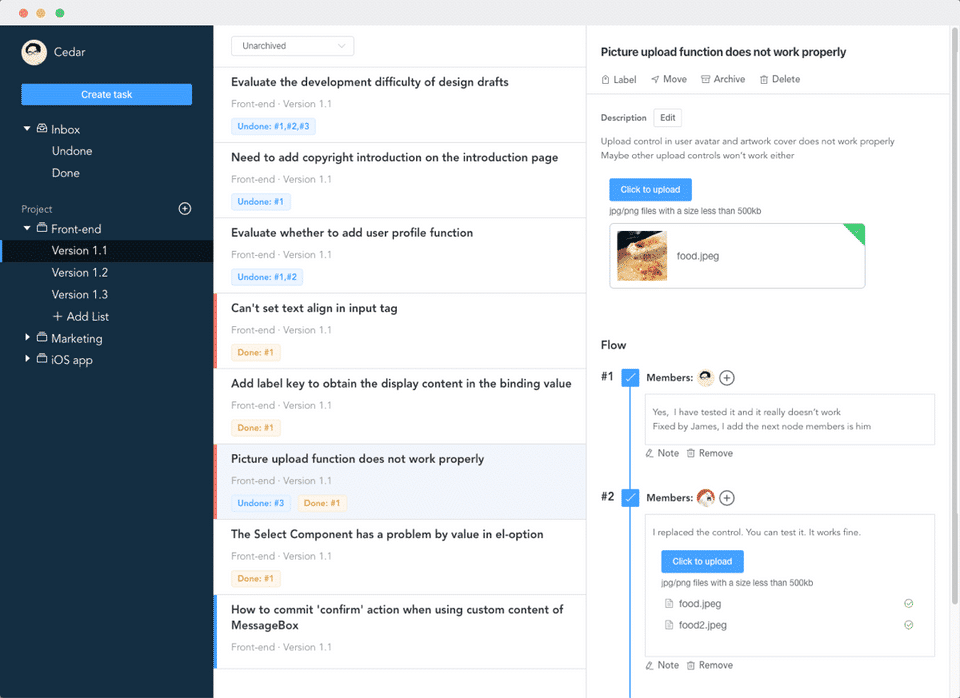
Screenshot 1
Pricing
TaskflowBox
USD
0
- Task flow
- Task tracking
- Inbox
- Project collaboration
- Task flow
- Task tracking
- Inbox
- Project collaboration
User Reviews
+ Write a Review
No reviews yet. Be the first to review!
Frequently Asked Questions
How much does TaskflowBox cost?
▼
TaskflowBox offers 1 pricing plan(s):
- TaskflowBox — USD0.00
What is TaskflowBox used for?
▼
TaskflowBox is a Task Management Software solution. Top features include:
- Recurring Task Management
- Percent-Complete Tracking
- Time Tracking
- Task Tracking
- Task Scheduling
Does TaskflowBox offer a free trial?
▼
TaskflowBox does not currently offer a free trial.
What support does TaskflowBox provide?
▼
TaskflowBox provides Online (Ticket) support.
Is TaskflowBox cloud-based or on-premise?
▼
TaskflowBox is Cloud Hosted software.
What training resources does TaskflowBox offer?
▼
TaskflowBox provides Help Guides,Blogs for training.


