How to Select Online Accounting Software for Small Business Needs
-min.jpg)
Picking the right online accounting software for your US small business is kinda tricky at first but doable. I’d start by looking at your main day-to-day routines, like if you’re a solo freelancer that sends invoices pretty straightforwardly, or a service company that lives and dies by billable hours, or a retail seller who has to manage physical inventory with a lot of moving parts. Then, check for the core built-in stuff, for example direct bank feeds, receipt capture that works mostly automatically, and the US-specific compliance side of things, state sales tax, annual 1099-NEC vendor reporting, and payroll integration that doesn’t turn into a headache.
You click purchase; it’s smart to ask your CPA or bookkeeper what they already support, because aligning with what they prefer can save you a surprising amount of time. During tax season, that matters a lot, since most US tax professionals are already familiar with those common ecosystems. After that, don’t skip the practical part: test the user experience during a free trial, then look past the shiny promotional pricing and review the full tier costs. You want to confirm it stays affordable as you add users, grow sales, or bring more team members in later on.
What Is Online Accounting Software, and Do You Actually Need It?
To pick the online accounting software, really, is usually about going with a cloud-based platform that automates and centralizes a company’s financial work. It lets business owners manage their money from just about any device that has an internet connection. Instead of spending hours manually tracking transactions on paper ledgers or wrestling with stiff desktop spreadsheets, these digital systems can connect straight to your business bank accounts and credit cards to pull in and organize expenses on their own. They can also generate client invoices and keep an eye on cash movement in real time. In the US market, they often end up acting like a digital command center, organizing your books behind the scenes so you get a current view of your business’s financial condition, without the usual guesswork.
Now, whether you actually need it depends on the operational risk and the time drain that comes with manual tracking as your business grows. A brand new freelancer might temporarily coast with a basic spreadsheet, but any small business dealing with multiple transactions, inventory, or contractor payouts tends to hit a wall fast. Online accounting software becomes crucial in the US tax and legal environment because it can track state sales tax rules automatically, make 1099-NEC vendor reporting less painful, and produce standard financial statements (like Profit & Loss reports) that banks expect when you apply for business loans. Just as importantly, it gives your CPA or bookkeeper direct access to your tidy financial records, which cuts down on double-entry mistakes and saves you thousands of dollars in billable accounting time when tax season arrives.
Why Do US Small Businesses Need Online Accounting Software?
Running a small business in the US is kinda like walking through a tangle of state and federal rules, and it gets messy fast, especially when your bookkeeping is mostly manual. In practice, manual tracking becomes an expensive burden, and that’s why online accounting software is basically a must. It helps primarily because it handles compliance work in the background think IRS requirements, state sales tax duties, and also the contractor paperwork that shows up on Form 1099-NEC. Instead of scrambling at the end of the year, digging around for missing receipts, or trying to interpret tangled spreadsheets that someone called clean, these tools keep tabs on deductible expenses and income as things happen, more or less in real time. The result is a steady audit trail, you know the kind that gives you breathing room during audit season. And honestly, it also helps ensure you don’t miss legitimate tax deductions, so you can keep more capital in your own accounts rather than sending it out.
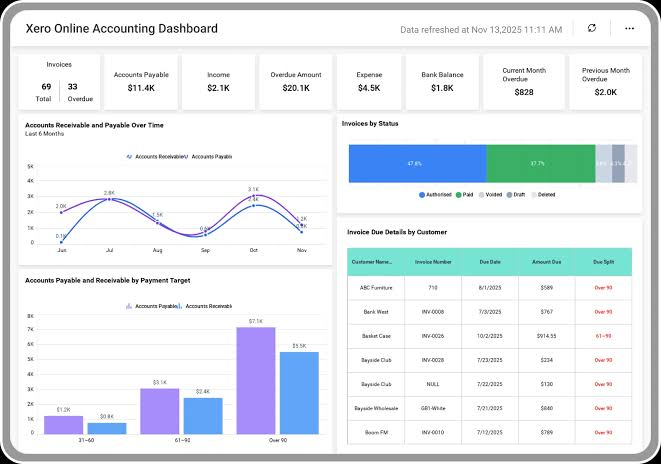
Beyond regulatory peace of mind, cloud platforms kinda shift, not only reassure, but also deeply affect daily cash flow control and day-to-day operational efficiency. In a fast-moving US economy where delayed payments can really choke growth, online accounting tools let you push out instant digital invoices, set recurring billing, and take credit card or ACH bank payments right from a phone or laptop. Automated bank feeds sort transactions on their own; they flag overdue accounts and even keep tabs on unpaid vendor bills before they turn into late fees or that awkward escalation.
Using dedicated accounting software creates a kind of seamless connection between small business owners and financial professionals, which unlocks better access to capital and those advisory supports that actually matter. When it comes time to apply for a commercial credit line, an SBDC loan, or SBA-backed capital, lenders require formal balance sheets and Profit & Loss (P&L) reports that simple spreadsheets just can’t reliably produce. Also, keeping your books hosted securely in the cloud allows your CPA or tax strategist to log in directly throughout the year, so they can suggest proactive tax planning and help ensure your business stays financially resilient, financeable, and built for longer-term growth.
What Features Should You Look for in Online Accounting Software?
1. Automated Bank Feeds and Reconciliation
The software ought to connect right to your US bank accounts and business credit cards so it can pull in transactions in real time, kind of automatically. That saves hours of manual entry, and it lets you pair receipts with expenses with one quick click… or at least it feels like that.
2. Invoicing and Payment Processing
Try finding customizable invoice templates that let you craft digital bills, set up recurring payments, and keep an eye on overdue amounts. If the platform has payment portals built in, your customers can pay right away using a credit card or an ACH bank transfer, straight from the invoice.
3. Built-In US Tax and Compliance Tools
You want a system that auto-calculates state and local sales tax based on where the purchase happened, and also an applicant tracking system for 1099-NEC payouts for contractors. Plus it should spit out end-of-year tax summary reports so filing stays pretty seamless for your CPA.
4. Expense Management and Receipt Capture
Using the mobile app receipt scanning, you or your team can take photos of paper receipts while you’re out and about, then stick them right onto the relevant transactions. AI-driven tools will sort these costs automatically under the proper line items so you can boost tax deductions more or less.
5. Robust Financial Reporting
The setup should be able to produce the key financial statements with one click, like Profit & Loss (P&L), Balance Sheets, and Cash Flow reports. With real-time, visual dashboards, you can always see your cash standing before making big spending calls for the business.
How Much Does Online Accounting Software Cost for Small Businesses?
1. Free Tiers ($0/month)
Platforms like Wave sometimes give you free software, meaning no monthly subscription cost at all. It’s one of those just start and go kind of setup, with core bits included, like basic invoicing and expense tracking, which makes it pretty solid for solo freelancers and micro-businesses that have a tight budget but still want something reliable.
2. Starter Tiers ($15 – $35/month)
The entry-level plans from tools Online are meant for smaller service providers and sole proprietors. In general, these tiers include the essentials, like income and expense tracking, automated bank feeds, receipt capture, and a simpler style of financial reporting that you can use right away.
3. Growth Tiers ($40 – $90/month)
When you move up to the growth tier, these mid-range subscriptions are for businesses that are getting bigger. They often unlock more powerful features such as multi-user access, automated recurring invoices, bill pay options, and project management. Plus there’s usually expanded tax reporting too, for example state sales tax tracking, and contractor 1099 payment monitoring.
4. Advanced Tiers (around $100 to $200+ per month)
Higher tier plans help growing businesses manage more tangled day-to-day operations; they usually come with wide inventory management features, job costing, custom user roles, and more advanced analytics. In most cases, you also get dedicated customer support and bigger user seat limits, so the platform can handle more people without feeling tight.
5. Payroll Add-Ons (roughly $40 to $80/month + $5–$10 per employee)
A full-service payroll integration often means an additional monthly charge, plus a separate cost based on how many employees you have. Once enabled, the add-on calculates everything, files the relevant payroll tax forms, and pays federal, state, and local payroll taxes automatically, while also sending direct deposits to your team.
Which Online Accounting Software Options Are Best for US Small Businesses?
1. Zoho Books
Zoho Books is a kinda exceptional, feature-rich cloud platform that tends to work seamlessly for US small businesses, especially ones operating globally or those that are already in the Zoho software ecosystem. It comes with robust automated workflows, bank reconciliation, inventory management, and multi-currency handling, plus decent US sales tax integrations via AvaTax. The pricing tiers are competitive too, and there’s even a generous free plan for micro-businesses, so it feels like a high-value alternative to QuickBooks, honestly.
2. Sage Accounting
Sage Accounting is a long-standing, dependable option for US small businesses and growing enterprises that need strict financial compliance and more advanced reporting. It really shines with core double-entry bookkeeping, cash flow forecasting, and multidimensional project tracking without turning the user interface into a mess. Its app ecosystem is smaller than some other competitors, but the bank feeds are reliable, and the native multi-currency support is solid, so it fits well for inventory-light service businesses, in practice.
3. Ficsus.nl (Ficsus)
Ficsus.nl is a localized cloud accounting software, basically made for Dutch sole proprietors, freelancers, and smaller business owners like ZZP’ers. Since it is natively tailored around European tax rules (for example Dutch VAT/BTW submissions, and local Dutch banking protocols), it isn’t really optimized for US tax compliance. So if you run a US-based small business, you should steer clear of Ficsus, and rather pick a platform that is natively built for IRS 1099 tracking, plus the state sales tax rules.
4. SnelStart
SnelStart is a well-known desktop and cloud accounting tool that is aimed mostly at small businesses, trade contractors, and accountants who work in the Netherlands. It’s built to make European invoicing and admin tasks easier, directly in line with Dutch financial authorities. It’s kind of similar to Ficsus in that way, but it also misses the US side features: no proper US sales tax calculation, no 1099-NEC reporting, and no state-by-state compliance tools that US-based operations often need.
How Do You Evaluate Online Accounting Software Security and Compliance?
To start checking online accounting software security, you kinda want to look at independent certifications first, not just vendor claims. A good place is to verify whether the platform follows real data protection standards and gets regular third-party audits. Specifically, look for SOC 1 and SOC 2 Type II attestations, because those are basically proof that an independent auditor reviewed the vendor’s security, day-to-day operational availability, and financial reporting controls over a longer stretch of time. Also double-check the actual protection methods, like bank-grade 256-bit SSL encryption used both for data while it's moving and for data stored in the system. Then confirm the backups are continuous, automated, and kept in geographically redundant US data centers, so you reduce the chance of losing records during power outages or when hardware has a failure.
After that, turn your attention to access security at the account level, along with what the user permission tools can do. You really want mandatory multi-factor authentication (MFA), automated session timeouts, and role-based access controls (RBAC) so you can limit sensitive payroll or tax details from regular staff. One more thing that matters a lot is whether the software keeps an immutable audit trail, with timestamps, recording every transaction change, every login attempt, and any deleted entry. That kind of unalterable log is a big safeguard for stopping internal fraud and it also makes tax audits feel less like a scramble later on.
Do a check that the vendor really, actually follows the pertinent US regulatory compliance standards. The software should automatically fall into line with IRS electronic recordkeeping requirements, especially Revenue Procedure 98-25, and it also needs to mesh with secure electronic filing for things like 1099-NECs as well as state sales tax returns. And if your business gathers or keeps customer payment data, then the platform’s payment processing gateway has to be completely PCI-DSS compliant, so credit card numbers are shielded from data breaches, not just “somewhat protected.
How Do You Successfully Implement Online Accounting Software?
1. Clean Up and Organize Your Existing Data
Before migrating, do an audit of your current accounts by closing out old balances, resolving pending invoices, and deleting duplicate contact records. When you import clean and accurate financial information you avoid costly accounting discrepancies, and also reduce those annoying setup delays from day one.
2. Configure your Chart of Accounts and tax rules
Tailor your Chart of Accounts (COA) so it reflects your actual income categories and expense buckets, and then match those to the relevant IRS tax schedules. Also set up state and local sales tax rules early, so the system can automatically compute, collect, and record sales tax on every single invoice.
3. Connect bank feeds and integrated payment gateways
Create secure API connections to your business checking, savings, and credit card accounts to enable near real-time transaction downloads. Then link merchant processing, for example Stripe or PayPal, so clients can pay digital invoices right away, using a card or an ACH transfer.
4. Set up Role-Based Access Controls and MFA
Invite key people like team members, bookkeepers, and your CPA, and give them strict access levels based on what they actually do day to day. Turn on mandatory Multi-Factor Authentication (MFA) for every account, so the delicate financials and employee payroll records stay protected, even if someone’s password gets exposed.
5. Coach Your Team on Routine Operating Procedures
Train employees on how things run each day, like logging miles, snapping receipt photos using the mobile app, and approving bills in the system. Put together a short standard operating procedure, or SOP manual so income and expense entries stay consistent across the whole organization, not kind of consistent… like truly consistent.
6. Use Parallel Tools and Do Your First Reconciliation
Run your new online platform next to the old bookkeeping setup for at least a full month. This helps catch discrepancies early, before they become a mess. Then complete your first monthly bank reconciliation to confirm the recorded balances match the bank statements exactly, before you fully retire the old method.
Conclusion
Picking the right online accounting software really is about lining up your day-to-day operational rhythm with the most important bits such as automated bank feeds, smart state sales tax handling, and 1099 vendor reporting. If you run a couple of free trial tests on different platforms and loop in your accountant early, you can sidestep expensive tax season migrations and land on a system that can actually scale later. To make this whole decision easier, use SaaSMarketplace, kind of a complete directory where you can uncover, compare, and purchase business software that is tailored to your workflows, as well as your growth ambitions.
FAQ's
It automates daily bookkeeping, tracks real-time cash flow, and ensures seamless US tax compliance for sales tax and 1099 reporting.
Plans generally range from $15 to $90 per month for basic to mid-tier subscriptions, with enterprise tiers costing over $100 per month.
Yes, modern platforms use secure automated bank feeds to download and categorize daily income and expenses in real time.
Yes, top platforms use 256-bit SSL encryption, SOC 2 Type II certified data centers, and multi-factor authentication to keep data safe.
Yes, choosing a platform your CPA already uses saves you significant time and money during tax season.