What Is SaaS Management? A Complete Guide to Managing Your SaaS Stack
-min.jpg)
Businesses no longer manage just a handful of traditional software applications. They manage an interconnected, fast-evolving stack of cloud subscriptions, users, vendors, licenses, and data that requires centralized visibility and control.
Across modern enterprises, Software-as-a-Service (SaaS) has revolutionized how teams operate. It enables instantaneous deployment, empowers individual departments to choose specialized tools, and supports agile workflows. However, this decentralized adoption has introduced a massive operational blind spot.
Organizations frequently face severe challenges, including:
- Subscription sprawl and shadow IT: Employees and department heads independently purchasing overlapping tools without IT or finance oversight.
- Unused licenses and seat waste: Paying for premium accounts that sit idle or remain assigned to former employees.
- Rising software costs: Unchecked subscription renewals and compounding monthly fees draining operational budgets.
- Security and compliance risks: Orphaned admin accounts, excessive third-party app permissions, and unmonitored data sharing.
To combat these hurdles, organizations need a structured, comprehensive SaaS management strategy. This guide explores everything you need to know about SaaS management and SaaS software management covering the core lifecycle, tangible business benefits, essential tools, evaluation criteria, and actionable best practices to regain total control of your cloud portfolio.
What Is SaaS Management?
At its core, SaaS management is the continuous process of discovering, monitoring, securing, optimizing, and governing an organization's Software-as-a-Service applications throughout their entire lifecycle.
Unlike traditional software installation, which was once handled strictly through centralized IT hardware deployments, SaaS operates in the cloud. It features recurring billing, rapid user provisioning, and decentralized procurement. SaaS management brings order to this dynamic environment by establishing single-pane-of-glass visibility over every application running within an enterprise.
What Does SaaS Management Involve?
Effective SaaS management encompasses several core disciplines:
- SaaS application discovery and inventory: Uncovering every official and unauthorized tool in use.
- Subscription and license management: Tracking who has access and whether that access is actually utilized.
- Software spending and renewal tracking: Monitoring billing cycles, contract terms, and financial commitments.
- User access and security management: Enforcing least-privilege principles and securing third-party integrations.
- Compliance and application governance: Ensuring corporate and regulatory data standards are met across all cloud assets.
SaaS Management vs. Traditional Software Asset Management
Many organizations confuse SaaS management with traditional Software Asset Management (SAM). While both aim to control software costs and ensure compliance, they differ fundamentally:
|
Feature |
Traditional Software Asset Management (SAM) |
SaaS Management |
|
Delivery Model |
On-premise installs, perpetual licenses, physical media. |
Cloud-hosted, subscription-based, continuous updates. |
|
Purchasing |
Centralized IT procurement and strict deployment cycles. |
Decentralized purchasing via corporate or departmental credit cards. |
|
Billing Structure |
Upfront license fees, annual maintenance renewals. |
Monthly or annual recurring subscriptions (SaaS). |
|
Usage Visibility |
Tracked via local installations, network discovery, or login logs. |
Requires API integrations, identity providers, and financial record matching. |
|
Lifecycle Speed |
Slow onboarding/offboarding; physical retrieval of software keys. |
Instant automated provisioning and rapid offboarding via SSO/IdP. |
As highlighted in industry guides from enterprise architecture leaders like LeanIX, managing cloud portfolios requires moving past static spreadsheets into dynamic, real-time discovery frameworks.
Why Is SaaS Management Important for Modern Businesses?
Adopting a strategic approach to enterprise SaaS management and SaaS portfolio management is no longer optional for growing companies. Without a dedicated governance framework, organizations bleed money and expose themselves to severe vulnerabilities.
Controlling SaaS Sprawl and Shadow IT
Shadow IT occurs when departments (such as Marketing, Sales, or HR) purchase and deploy software without consulting IT or Security. This leads to severe redundancy such as a company paying for three different project management tools across different divisions. SaaS management uncovers these hidden tools, helping leadership consolidate redundant platforms and streamline the technology stack.
Reducing SaaS Spending and License Waste
According to industry benchmarks, organizations waste a significant percentage of their software budgets on unused licenses, duplicate subscriptions, and automatic renewals that occur without business justification. By tracking actual usage metrics, financial teams can right-size subscription tiers, reclaim dormant licenses, and eliminate unnecessary overhead.
Improving Security and Compliance
Every connected SaaS application represents a potential data entry point. Excessive user permissions, orphaned accounts left active after an employee departs, and unvetted third-party integrations create massive compliance risks. Centralized SaaS data management ensures that sensitive corporate and customer data remains secure, access permissions are audited regularly, and regulatory mandates are strictly followed.
Improving IT and Procurement Efficiency
When IT, Finance, Procurement, and Security operate in silos, managing renewals becomes a chaotic scramble. Centralized oversight reduces manual spreadsheet tracking, automates administrative bottlenecks, and empowers procurement teams with accurate usage data during vendor negotiations.
What Does SaaS Management Include?
A mature SaaS management program relies on several foundational pillars that work together to maintain a secure, cost-effective tech stack.
SaaS Discovery and Application Inventory
You cannot manage what you cannot see. Organizations identify applications through a multi-layered discovery process:
- Identity Providers (IdP) & SSO: Reviewing logs from platforms like Microsoft Entra ID or Okta.
- Financial Records: Analyzing expense reports, credit card statements, and accounts payable invoices.
- Browser Activity & Network Proxies: Detecting browser extensions or outbound traffic to unknown domains.
- Direct API Integrations: Connecting directly to business systems to map active data flows.
SaaS Subscription and License Management
This capability focuses on optimizing seat allocations. Teams track how frequently licenses are used, reclaim seats from inactive employees, and match subscription tiers (e.g., moving an enterprise user down to a standard tier if advanced features go unused).
SaaS Spend and Renewal Management
Financial visibility is critical. This involves tracking total cost of ownership (TCO), identifying contract owners, setting automated renewal notifications, forecasting future budgets, and leveraging utilization data to negotiate favorable terms during vendor contract renewals.
SaaS Security and Access Governance
Security oversight covers role-based access controls (RBAC), enforcing least-privilege permissions, conducting routine access reviews, and executing instant, automated employee offboarding to ensure departing staff immediately lose access to company data.
SaaS Data Management and Compliance
Organizations must govern how data moves between connected SaaS applications. This pillar ensures that data privacy standards (such as GDPR, CCPA, or SOC 2) are maintained, shadow data silos are prevented, and integration permissions are continuously audited.
Understanding the SaaS Management Lifecycle
The SaaS management lifecycle is a continuous, repeatable framework for governing applications from initial discovery to eventual retirement.
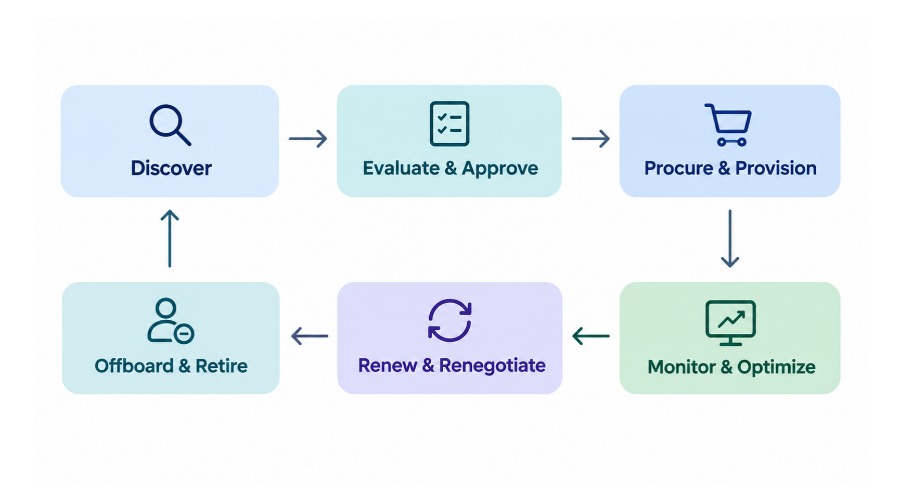
The Six Stages of the SaaS Management Lifecycle
- Discover: Identify every application, subscription, vendor, and business owner across the enterprise using automated scanning tools and financial audits.
- Evaluate and Approve: Assess the business value, security posture, regulatory compliance, cost, and potential functional overlap with existing tools before greenlighting a new purchase.
- Procure and Provision: Purchase approved subscriptions under standardized contract terms and assign licenses and access securely according to employee roles.
- Monitor and Optimize: Track daily adoption, active usage metrics, spending fluctuations, access permissions, and license utilization to ensure high return on investment (ROI).
- Renew and Renegotiate: Review business needs, historical usage data, contract terms, and pricing structures months before upcoming renewal dates.
- Offboard and Retire: Revoke access, reclaim licenses, cancel unnecessary subscriptions, and safely archive or delete business data when a tool is no longer needed.
This lifecycle is cyclical. Insights gained during usage reviews and renewal decisions feed directly back into future purchasing choices and application rationalization efforts.
What Are Key Benefits of a SaaS Management Platform?
A SaaS management platform (SMP) is a centralized software solution designed to help organizations automate the discovery, management, optimization, and governance of their entire SaaS ecosystem. Leading frameworks, such as those outlined by BetterCloud, emphasize several core advantages:
Better Visibility Across the SaaS Stack
Centralized application, vendor, license, and usage data gives leadership a unified view of the entire digital landscape, replacing fragmented spreadsheets with real-time insights.
Lower Software Costs
SMPs automate license reclamation, highlight duplicate applications, and provide hard usage data that procurement teams use to slash renewal costs and avoid paying for ghost licenses.
Stronger Security and Compliance
Platform automation delivers instant visibility into user access rights, accelerates offboarding workflows, and enforces consistent security policies across all cloud environments.
Automation and Operational Efficiency
SMPs eliminate tedious manual tasks by automating user provisioning, deprovisioning, renewal alerts, and repetitive administrative workflows across HR and IT systems.
Better Collaboration Across Business Functions
Shared data breaks down internal silos, allowing Finance, Procurement, IT, and Security to collaborate using a single source of truth.
Essential SaaS Management Tools and Features
When evaluating technology, understanding what features separate basic trackers from robust SaaS management software is vital.
Must-Have SaaS Management Tool Features
- Automated, multi-source application discovery.
- Centralized SaaS inventory and vendor contract records.
- License utilization and granular cost analytics.
- Contract and renewal tracking with automated alerts.
- Identity, access, and offboarding automation workflows.
- Deep integrations with HR, finance, SSO, and IdP systems.
- Robust reporting and dashboard customization.
SaaS Management Tools for Enterprise Software Asset Managers
Enterprise software asset managers require advanced capabilities, including multi-department visibility, comprehensive audit trails, strict policy enforcement, handling complex multi-tiered enterprise contracts, scalable cross-tenant automation, and native integration with existing IT Asset Management (ITAM) systems.
SaaS Management Software vs. Spreadsheets
While spreadsheets are free, they quickly fail as organizations scale. Manual tracking introduces human error, lacks real-time visibility, misses hidden shadow IT, and requires countless hours of administrative upkeep. Dedicated SaaS software replaces manual overhead with automated accuracy and real-time intelligence.
How to Choose the Right SaaS Management Solution
Selecting the ideal SaaS management solution requires a structured evaluation of your organization's unique operational maturity and goals.
1. Identify Your Organization's Needs
Assess your current application count, total software spending, strictness of security requirements, and your team's current management maturity level.
2. Evaluate Integration and Automation Capabilities
Check for seamless compatibility with your core identity providers (e.g., Okta, Microsoft Entra ID), HR systems (e.g., Workday), financial platforms, and key business SaaS tools.
3. Compare Scalability, Reporting, and Total Cost
Analyze the implementation effort required, data coverage depth, reporting flexibility, automation depth, vendor support quality, and transparent pricing models.
4. Match the Solution to Business Size
- Small Business / Mid-Market: Focus on basic inventory tracking, renewal reminders, and straightforward usage visibility (SaaS management small business).
- Large Enterprise: Prioritize advanced governance workflows, granular role-based permissions, cross-functional reporting, and robust automation (enterprise SaaS management platform).
SaaS Management Best Practices
Implementing a strategic framework requires actionable operational habits. Organizations should adopt these core best practices:
- Maintain a Centralized SaaS Inventory: Assign a clear business owner to every application and maintain accurate subscription, cost, and contract data.
- Establish a Clear SaaS Procurement Policy: Require formal business justification and security reviews for all new software purchases to curb shadow IT.
- Review License Usage Regularly: Schedule monthly or quarterly utilization audits to reclaim dormant seats and eliminate duplicate tooling.
- Automate Employee Onboarding and Offboarding: Connect HR system triggers directly to access provisioning and removal workflows to close security gaps instantly.
- Schedule Renewal and Vendor Reviews: Set automated alerts well in advance of renewal dates to evaluate actual utility and negotiate better terms.
- Track Key Performance Indicators (KPIs): Measure active applications, license utilization rates, total SaaS spending, renewal savings, and offboarding completion speed.
SaaS Management Challenges and How to Overcome Them
|
Challenge |
Recommended Approach |
|
Incomplete SaaS inventory |
Combine financial records, identity provider logs, and automated discovery sources. |
|
Duplicate subscriptions |
Review overlapping functional capabilities and department usage metrics. |
|
Unused licenses |
Establish recurring utilization reviews and automated seat reclamation rules. |
|
Security gaps |
Standardize automated access reviews and offboarding checklists. |
|
Missed renewals |
Maintain single-owner contract tracking with automated calendar reminders. |
|
Disconnected teams |
Define shared operational processes uniting IT, Finance, Procurement, and Security. |
Conclusion
Effective SaaS management gives modern organizations the visibility, cost control, security, and lifecycle governance required to thrive in a cloud-first world. By moving away from manual spreadsheets and adopting structured discovery, lifecycle management, and automation platforms, businesses can eliminate waste and secure their digital environments.
Ready to gain total control over your cloud stack? Assess your current SaaS portfolio today, identify your biggest license and security gaps, and explore a suitable SaaS management platform to drive operational excellence.
FAQ's
SaaS management services refer to specialized managed or advisory offerings provided by third-party experts. They help organizations discover applications, optimize license tiers, manage complex contract renewals, and improve overall cloud governance without requiring a massive internal headcount.
Key best practices include maintaining a centralized application inventory, enforcing strict procurement policies, conducting regular license utilization reviews, automating access governance, and tracking renewals ahead of time.
Small businesses can start by building a foundational subscription inventory spreadsheet, assigning app owners, tracking renewal dates, reviewing monthly usage, and introducing lightweight approval guidelines for new software requests.
Microsoft 365 offers built-in admin tools for license assignment and reclamation, Microsoft Entra ID access controls, and security audit logs. However, SaaS management Office 365 administration often requires supplementary third-party integrations to monitor applications outside the Microsoft ecosystem.
An SMP provides unified visibility into spending, contracts, application usage, user access, and security risks. Finance uses the data for budget forecasting, Procurement for vendor negotiations, IT for stack rationalization, and Security for risk mitigation.