Cloud vs On-Premise Construction Management Software
-min.jpg)
When building a standard technology architecture for a growing firm, software procurement managers look across diverse software categories to sync office operations with site needs. Many corporate IT teams initiate this search by evaluating core business layouts, often scanning through choices like CRM Software, dedicated Real Estate CRM Software, or baseline Accounting Software to manage financial entries. At the same time, aligning project timelines requires robust Project Management Software, while monitoring yard supplies calls for functional Inventory Management Software options. Selecting a specific mix helps structure how your back-office systems share critical data points.
 Looking for Construction Management Software? Check out SaaS Marketplace List of the Best Construction Management Software in USA for Your Business
 The construction industry across India is experiencing rapid growth as the country embraces the massive infrastructure development initiatives underway globally. As cities grow and smart projects emerge, the need for construction management software becomes inevitable for developers who wish to remain in the race. With the market being as competitive as it is, managing projects through Excel sheets or traditional methods will see contractors burn through capital without realizing value for their time and money. As a result, forward-thinking Indian builders are upgrading to specialized Construction Software to gain real-time insights into field operations and corporate accounts.
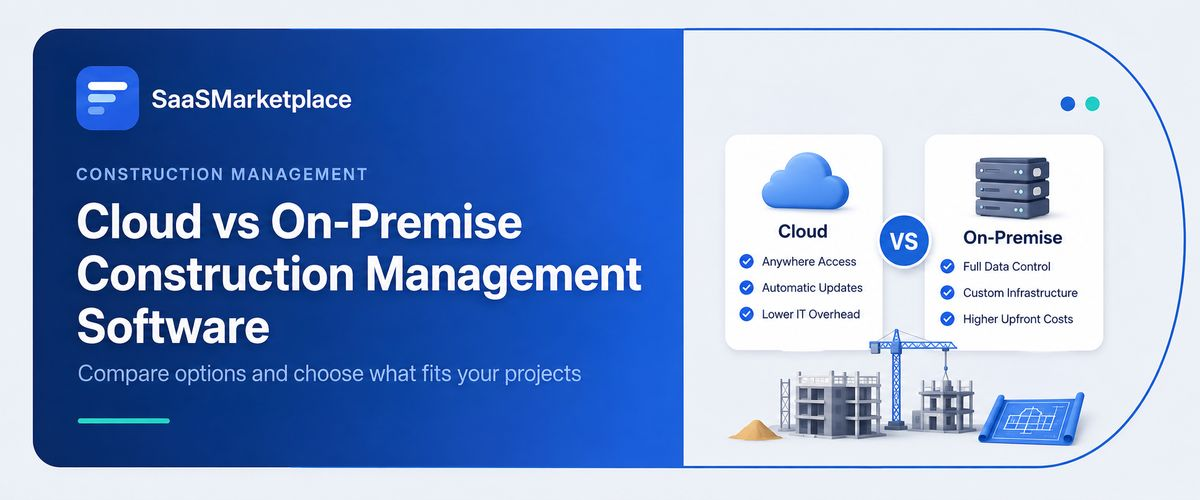
What Is Cloud Construction Management Software?
Cloud-based Construction Management Software means your tools and files live safely on off-site servers that a tech vendor runs for you. You don’t need a heavy computer setup in your main office or a staff of IT engineers just to open a folder. Instead, team members log in using a web link on their laptops or pull up an application on their mobile phones while standing on a concrete pour. This completely changes how fast information spreads through a real estate business. Instead of updates getting stuck in a site log, everything stays active in a live database. If a supervisor marks a milestone in Chennai, your accountant in Hyderabad sees the budget shift right away.
This setup helps home builders, commercial general contractors, and subcontractors work off the same blueprint. You don’t have to pay massive sums upfront to buy server towers or run backup hardware in your main office closet. The software provider handles storage needs, daily server health, and system speed behind the scenes. Most construction groups pay for cloud Construction Software using a simple month-by-month or yearly plan. This lets a firm handle software costs as a normal, steady monthly expense, avoiding the need to spend big capital reserves before a major build begins.
What Is On-Premise Construction Software?
On-premise Construction Software means you buy a permanent copy of a software license and load it directly onto your own company computers and office servers. Your business owns the gear, and your internal IT staff takes care of everything from setting up the office network to wiring the storage units. Every piece of contract paperwork, every daily log, and your complete financial history stays inside your physical office walls on a server you can see.
For a long time, large engineering firms chose this style because they wanted complete custody of their private blueprints and corporate data records. Since the software runs inside a local network, office employees can open files and compile reports even if the main office internet drops out. However, this model forces you to keep full-time tech workers on the payroll to manage network cables, fix server errors, and run manual backups. While it gives you physical ownership of your databases, it makes it very difficult for field engineers to share fast updates from a remote job site.
Cloud vs On-Premise Construction Software: Key Differences
1. Deployment Method
Setting up cloud Construction Management Software takes very little time, allowing your company to go live and log jobs within a few weeks. The vendor has already provisioned servers with the system; your team only needs to configure user profiles and individual processes. Systems in an on-premise deployment require a significantly longer implementation time due to the required hardware provisioning, network installation, and database configuration before any reports can be generated.
2. Cost Comparison
Cloud Construction Software structures your bills into a steady, predictable subscription price that rolls software use, updates, and customer support into one flat fee. On-premise choices demand a large chunk of cash immediately to purchase permanent user licenses and high-grade office servers. Beyond that initial payment, on-premise systems bring ongoing expenses like power bills for chilly server rooms, hardware replacements, and the cost of keeping an IT specialist on staff. Organizations also evaluate Expense Management Software to monitor operational spending, project expenses, and software-related costs more efficiently.
3. Security Differences
Data safety in a cloud Construction Management Software network relies on top-tier global data centers with constant monitoring, strict encryption, and automated defenses. These systems copy your files across multiple secure regions so a physical problem in one center won't destroy your corporate records. With an on-premises setup, your file safety depends entirely on your own team; if a server room floods, catches fire, or gets hit by a virus, your data recovery depends on your last manual backup disk. Many companies also integrate Cloud Security Software to strengthen encryption, identity management, and compliance for cloud-hosted construction data.
4. Accessibility and Remote Work
Modern construction projects are highly dependent on constant input from the site, making accessibility a critical element. Cloud-Based Construction Software allows foremen, project managers, and suppliers to upload daily reports, track hourly manpower, and view design changes directly into the application on the jobsite through a mobile device. This level of efficiency is inaccessible in an on-premise solution, as field personnel are required to fill out and log paper reports and time logs back in the office before being entered into the centralized database.
5. Software Updates and Maintenance
Keeping cloud Construction Management Software current takes no effort from your business since the provider pushes new features and tax patches into the application automatically. This keeps your company on the newest version without causing work stoppages. On-premise updates require careful planning, internal system downtime, and hours of manual IT work to make sure custom accounting links don't break when a new version rolls out.
Benefits of Cloud Construction Software
Moving your workflows to a cloud Construction Management Software system gives your entire construction company an immediate boost in speed and clarity. The biggest win is getting an honest, live look at your project costs and profit margins. Company owners don't have to wait for weekend meetings or look through old receipts to see if a job is making money. Instead, live screens show exactly what you spent versus your initial estimate the moment a field manager signs off on a delivery. Integrating Business Intelligence Software provides interactive dashboards and performance analytics, helping management make faster decisions based on real-time project data. This real-time view helps you spot rising material costs early and change your plans before a project goes into the red.
This path also cuts down the cash needed to get a new software system off the ground. Instead of spending large sums on corporate network gear, a general contractor can put that money straight into buying building materials or hiring specialized subcontractors. Scaling your business becomes much simpler too; when your firm wins new tenders in other states, you don’t need to install new office hardware. You simply update your software subscription to add more profiles, allowing your business to grow smoothly without hitting technical walls.
Additionally, cloud Construction Software closes the communication gap between site crews and office teams. Supervisors use their mobile phones to snap photos of completed brickwork, register incoming concrete trucks, and file delay notices instantly. Site photos, blueprints aur approvals ki baat ho rahi hai, uske baad Document Management Software mention karo. This direct data flow stops double-entry mistakes, speeds up subcontractor invoice approvals, and ensures your accountants and project managers look at identical, accurate numbers.
Benefits of On-Premise Construction Software
Even with the major shift toward cloud platforms, on-premise Construction Software remains a viable option for specific types of enterprise operations. The primary advantage is holding absolute physical power over your entire technology stack and database environment. Massive infrastructure firms that handle highly sensitive public projects or strict security contracts often choose to keep their data inside private walls. This setup ensures that your own data rules, file permissions, and storage methods match internal corporate safety policies exactly.
This path also keeps your software running smoothly without any reliance on a public internet connection. On heavy civil builds like carving out mountain highways, building rail links, or digging tunnels in deep rural zones with zero cellular signal, an on-premise system running over local office cables keeps trailers connected to historical files. For older, established organizations that already own private server infrastructure and employ an active IT department, keeping things on-premise helps extract the full value from those past capital investments.
Cloud vs On-Premise: Which One Is Better for Construction Companies?
For almost every growing builder and general contractor operating in 2026, cloud Construction Management Software represents the smarter, faster, and more profitable choice. The building industry relies entirely on movement, fast field answers, and teamwork among separate groups like property owners, architects, site crews, and material yards. An on-premise setup locks your data inside a central office building, creating information blocks that delay field decisions and leave site managers working without clear financial updates.
Looking at long-term value, cloud choices do away with the unexpected hardware repair costs and expensive server updates that come with on-premise setups. They let an engineering firm focus completely on its real strengths- pouring concrete and finishing builds on schedule rather than running a small data center. Unless your business deals with strict state rules that legally force you to keep data on a physical server in your office, a cloud Construction Software platform provides the speed and financial clarity you need to secure your margins.
How to Choose the Right Construction Software in 2026?
Finding the best Construction Management Software requires a clear look at your daily operational bottlenecks and your long-term growth plans. To make your evaluation process straightforward, follow this clear step-by-step path to check different systems:
- Check Field Mobility: Track where your managers spend their working hours. If your supervisors stay out on site, picking a platform with excellent mobile functionality is critical for keeping daily job logs accurate.
- Verify Accounting Links: Make sure site records connect directly to your budget screens. A quality system must tie field labor logs and delivery notes straight to your job-cost trackers without manual data entry.
- Review Financial Reports: Search for software that builds automated Work-in-Progress (WIP) statements and instant profit updates, saving your accounting team from spending days building Excel sheets at the end of the month.
- Compare Setup Timelines: Ask providers for honest deployment schedules. Flexible, web-based tools can go live for your active teams within 60 days, while old-school enterprise layouts often take a year of custom programming.
- Test the User Experience: Get your people involved in software trials. Make sure your site engineers and office bookkeepers find the screens easy to read and simple to navigate without needing a degree in computer science.
Conclusion
To sum it up, deciding between cloud and on-premise Construction Software changes how your business handles its jobs and tracks its money for years to come. While on-premise setups give you total hardware custody if you have strict data regulations, they generally lack the mobile flexibility that modern field teams need to stay on track. On the flip side, cloud Construction Management Software brings your field trailers and central office into one shared system, giving your executive team the live cost data required to protect project profits.
FAQ's
Cloud tools run on remote vendor servers over the internet, so you don't need any physical server hardware in your office.
It puts live blueprints, change orders, daily schedules, and time tracking logs directly onto the smartphones of your site crews. This immediate link means supervisors can log delays or check structural revisions right from the field, reducing construction mistakes and miscommunications.
Yes, reputable cloud providers protect your files inside massive, professional data centers that use high-grade data encryption, multi-factor logins, and round-the-clock safety checks.
Yes, on-premise tools run through your local office network cables, meaning office staff can open databases and manage project files even during a complete web outage.
Aside from the first license fee, on-premise choices bring steady costs for replacing old servers, running data cooling units, buying backup disks, and paying tech support salaries.