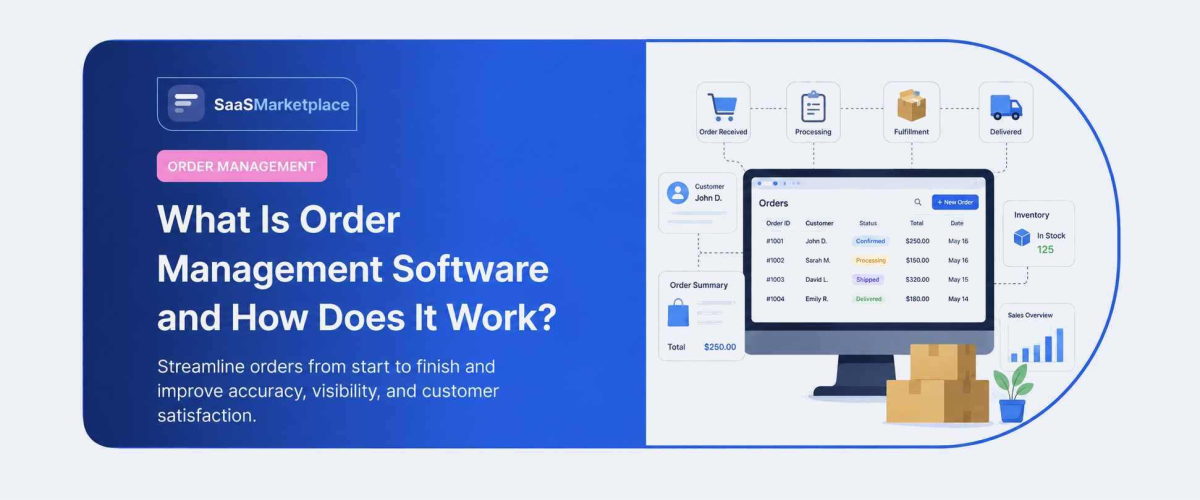
What Is Order Management Software and How Does It Work?
-min.jpg)
Order management software tracks an order from the moment somebody clicks buy through to delivery and through the return if one comes back. What that involves in 2026: pulling orders in from every sales channel, keeping inventory truthful across locations, deciding automatically where each order should ship from, and handing off to a carrier without anyone rekeying an address.

Looking for Order Management Software? Check out the SaaS Marketplace list of the best order management software in USA for your business.
The problem it solves shows up during your busiest week rather than your quietest. Two customers buy the last unit of something within four minutes of each other on different channels. One gets a shipment, the other gets an apology, and somebody in customer service spends twenty minutes explaining why the website said it was in stock.
What Is Order Management Software?
Order management software is the layer sitting between your sales channels and your fulfillment operation. It holds one version of what you have and one version of what has been sold.
How Order Management Systems Work
An order arrives from wherever it was placed. The system validates it, confirms payment, and reserves stock against it so nobody else can sell the same unit.
Routing logic then decides which location it fulfills. That decision weighs stock availability, distance to the customer, fulfillment cost, and carrier cut-off times rather than defaulting to whichever warehouse is largest.
Once released, the order goes to the warehouse for picking, a carrier gets selected, a label prints, and the customer gets a tracking number. The order management system tracks status across all of it and holds the audit trail.
Order Management Software vs Inventory Management Software
Inventory management software answers what you have and where it sits. Stock levels, reorder points, warehouse locations, purchase orders.
Order management software answers what has been promised and how it gets delivered. The two overlap on stock counts and diverge on everything else.
Smaller operations often run one product covering both. Past a certain volume the routing logic outgrows what an inventory tool provides, and that is usually when businesses separate them.
The Order Lifecycle: From Placement to Delivery
Seven stages, and the order management software owns all of them:
Stage 1: Placement and capture across every sales channel Stage 2: Validation and payment confirmation Stage 3: Inventory allocation and reservation Stage 4: Picking, packing, and fulfilment preparation Stage 5: Carrier selection and label generation Stage 6: Delivery confirmation and customer notification Stage 7: Returns processing and reverse logistics
Stage 1: Order Placement and Capture
Orders arrive from your website, marketplaces, retail POS, a B2B portal, or somebody phoning the office. Each source formats data differently, and normalizing that is the first job.
Stage 2: Order Validation and Payment Processing
Address checking, fraud screening, payment authorization, and confirming the customer is who they claim to be. Order processing software handles most of this without a human reviewing anything.
Catching a bad address at this stage costs nothing. Catching it after the parcel has shipped costs a redelivery and an apology.
Stage 3: Inventory Allocation and Reservation
Stock gets reserved against the order rather than merely counted down. That reservation is what prevents overselling during a traffic spike.
Stage 4: Picking, Packing and Fulfillment
The order is released to a warehouse and becomes physical work. This is the handoff point between order management software and a warehouse management system, where one guides and the other executes.
Stage 5: Shipping and Carrier Integration
Carrier selection based on cost, speed, and service level, then label generation. Good order fulfillment software compares rates automatically rather than defaulting to one carrier.
Stage 6: Delivery Confirmation and Customer Notification
Tracking updates flowing back to the customer without anybody sending them manually. Most order tracking software handles this through automated status emails triggered by carrier scans.
Stage 7: Returns and Reverse Logistics
The stage most systems handle worst. Returns need authorisation, inbound tracking, inspection, restocking or disposal, and a refund, and each of those touches a different team.
Key Features of Order Management Software
Centralized Order Dashboard
Every order from every channel in a single view, filtered by status or exception. It sounds unremarkable until you work somewhere without one, at which point it becomes the feature people ask for first.
Multi-Channel Order Aggregation
Website, marketplace, retail, and wholesale orders arriving in the same queue. E-commerce order management gets considerably harder once you add a second marketplace, since each has its own rules on fulfillment timing.
Real-Time Inventory Sync
One stock number shared across every channel, updated as orders arrive. This single feature prevents most overselling.
Automated Order Routing and Fulfillment Rules
Distributed order management is the term for the logic deciding where each order ships from when inventory sits across stores, warehouses, and partners. Done well it also avoids splitting shipments, which raises cost and increases the chance of a return.
Shipping Carrier Integration
Rate shopping, label printing, and tracking, all without leaving the system.
Returns and Refund Management
RMA generation, inbound tracking, and refund triggering. Worth testing properly during evaluation, since it is where products differ most.
Reporting and Order Analytics
Fulfilment cost per order, cycle time tracking software by location, and exception rates. These numbers turn fulfillment strategy from reactive into deliberate.
How Does Order Management Software Work?
Connecting Sales Channels in One Place
APIs pull orders in from each channel and drop them into one queue. Order processing software then applies identical validation rules regardless of whether the order came from your website or a marketplace.
Automating Order Routing to the Right Warehouse
The routing engine is the real intelligence. It weighs proximity, stock, cost, and carrier deadlines to pick a fulfillment location per order rather than per batch.
Syncing Inventory Across Locations in Real Time
Every allocation updates the shared count immediately, which is what keeps channel listings honest during a busy period.
Triggering Shipping and Customer Notifications
Status changes fire notifications automatically. Customers get told without a person deciding to tell them, which is most of what people mean by good post-purchase experience.
Who Uses Order Management Software?
eCommerce Retailers and DTC Brands
The largest buying group. Multi-channel selling makes an order management system necessary well before most brands expect.
Wholesale and B2B Distributors
Different requirements entirely. Purchase order handling, credit terms, partial shipments, and contract pricing all matter more than consumer tracking emails.
Multichannel Retailers
Online plus physical stores, often with ship-from-store fulfilment. This group gets the most from distributed order management, since store inventory becomes usable rather than stranded.
3PL and Fulfillment Providers
Managing orders on behalf of multiple clients, each with their own rules and reporting requirements.
Key Benefits of Order Management Systems
The order management system benefits that show up in operational numbers:
Fewer Order Errors and Fulfillment Mistakes
Most order errors trace back to somebody retyping information from one system into another. Remove that step and the errors go with it.
Faster Order Processing and Delivery Times
Automated routing cuts hours out of the gap between order placed and order released. That gap is invisible to you and very visible to the customer.
Better Inventory Visibility Across All Locations
Knowing what sits where, right now, across every location. Overselling and stranded stock both trace back to not knowing this.
Improved Customer Satisfaction and Repeat Orders
Accurate delivery promises kept consistently. Among the order management system benefits this is the hardest to measure and probably the most valuable.
Order Management Software vs ERP: Key Difference
An ERP runs the whole business. Finance, procurement, manufacturing, HR, and yes, orders as one module among many.
Order management software does one thing deeply. The routing logic, carrier integrations, and returns handling go further than any ERP software order module typically reaches.
Larger companies frequently run both, using the OMS for orchestration and passing financial records into the ERP. If order complexity is your bottleneck rather than financial complexity, the specialist tool wins. Our guide on when to move from OMS to full ERP covers the crossover point.
Future of Order Management Technology in 2026 and Beyond
"Orchestration" is the word doing the work now. The distinction being drawn across the industry is between systems that manage order data and systems that add a decision layer deciding what happens to each order without a person involved.
Cloud-native architecture has become standard, with AI applied to demand forecasting and delivery promising. API-first design matters more than it used to, since most operations now connect five or six systems rather than two.
The practical advice from most 2026 analyses is consistent. Match the platform to your operating model. Distributed fulfillment needs orchestration and inventory accuracy. A growth-stage brand needs fast implementation and clean integrations instead.
Conclusion
Order management software becomes necessary at a fairly predictable point, which is when you sell across more than one channel and fulfill from more than one location. Below that, a decent e-commerce platform with inventory tracking usually covers it. Above it, the cost of getting routing wrong compounds every week. The honest test is your exception rate. Count the orders each week that need somebody to intervene manually, then work out what that intervention costs in hours. Most operations are surprised by the total. Also worth reading: how inventory software connects to order management, since the boundary between the two is where most implementation problems appear.
FAQ's
Inventory management tracks what you have and where it sits, while order management tracks what's been promised and how it gets delivered.
They are placement, validation, inventory allocation, picking and packing, carrier selection, delivery confirmation, and returns processing.
It reserves stock against an order in real time and syncs inventory across every channel as orders come in.
E-commerce retailers, wholesale distributors, multichannel retailers, and 3PL fulfillment providers.
An ERP runs the whole business across many functions, while order management software focuses deeply on routing, carriers, and returns.