What Is POS Billing Software and How Is It Different From a Full POS System?
-min.jpg)
A cafe owner sets up "POS software" expecting it to handle inventory and staff hours, then finds out three weeks later that all it actually does is ring up sales and print receipts. That mismatch between what people expect and what they get happens more than it should, mostly because vendors throw the word "POS" around loosely and let buyers fill in the rest.
 Looking for POS Billing Software? Check out SaaS Marketplace’s List of the Best POS Billing Software in the USA for your business.
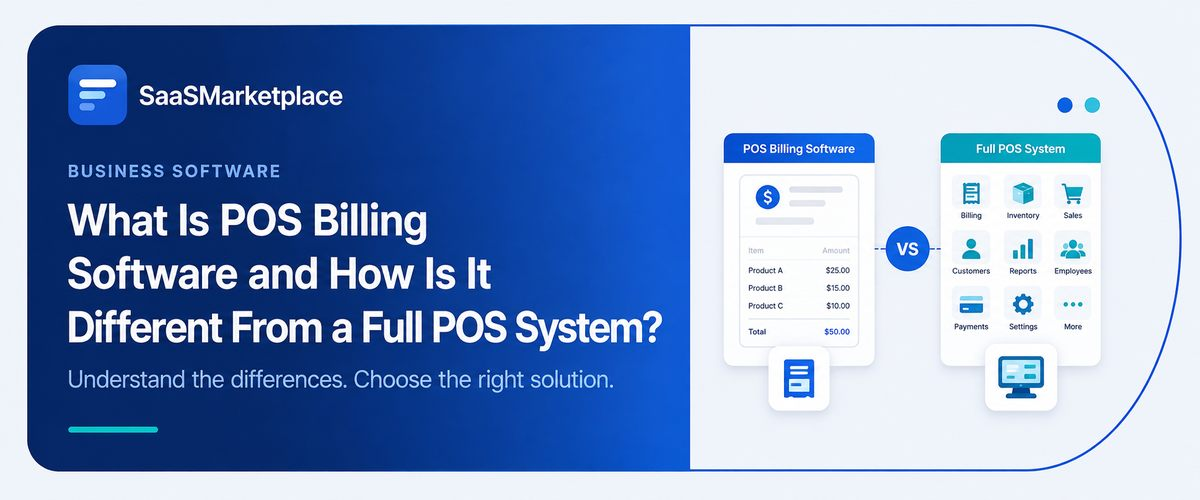
POS billing software is the transaction layer the part that calculates totals, applies tax, takes payment, and generates a receipt. A full POS system includes billing but adds inventory tracking, staff management, customer data, and reporting on top of it. Figuring out which one you're actually signing up for, before the contract is signed, will save you a lot of headaches down the line.
Key Takeaways
- POS billing software handles the checkout transaction itself pricing, tax, payment, and receipts and nothing beyond that.
- A full POS software system wraps billing into a larger platform covering inventory, staff, customers, and reporting.
- Restaurant POS software and retail POS software solve different operational problems, even when they're built on similar billing engines.
- An iPad POS software setup trades some hardware ruggedness for lower upfront cost and easier staff training.
- A grocery store POS system has requirements like barcode volume and weight-based pricing that generic billing tools usually can't handle well.
Why the "POS" Label Causes So Much Confusion
Ask ten POS vendors what their product does, and you'll get ten slightly different answers, because "point of sale" has become a catch-all term covering everything from a $20-a-month receipt printer app to a full operational platform running inventory, payroll, and customer loyalty.
That's not really an accident. A broader label just sells better, even when what's actually in the box is a lot narrower than the pitch makes it sound.
Usually the mismatch doesn't show up until after onboarding is already done a business owner goes looking for an inventory report, or tries to pull a staff clock-in log, and realizes the software was never built to generate either one. Nobody lied to them exactly. It was billing software marketed with POS-system language.
This matters more than it sounds like it should, because the two categories serve genuinely different needs. A solo consultant invoicing clients doesn't need inventory tracking. A three-location retail chain absolutely does. Buying past your actual requirement wastes money; buying under it means outgrowing the software within a year.
What POS Billing Software Actually Covers
Strip it down to fundamentals, and POS billing software does one job well: it turns a transaction into a clean, accurate charge. That means calculating item totals, applying the correct tax rate, processing the payment card, cash, or digital wallet and issuing a receipt, either printed or digital.
Some billing tools go slightly further, offering basic discount codes, tip calculation, or split payments between multiple cards. But the core scope stays narrow by design. There's no meaningful inventory tracking, no staff scheduling, no customer relationship data beyond maybe a name and email captured at checkout.
For businesses with simple, high-volume, low-complexity transactions a food truck, a small service business, a pop-up stall that narrowness is a feature, not a limitation. Less software to configure means less that can break during a Saturday rush. The mistake is assuming this scope will still be enough once the business adds a second location or a product line that needs tracking.
What a Full POS System Adds on Top
A full POS system starts with that same billing engine and builds outward. Inventory management is usually the first major addition tracking stock levels in real time, flagging low-inventory items, and syncing sales data back to purchasing decisions automatically instead of through a manual spreadsheet update at the end of the week.
Staff management tends to come next: clock-in and clock-out tracking, permission levels so a cashier can't void a transaction without manager approval, and sales performance broken down by employee.
Customer data usually follows purchase history, loyalty point tracking, and targeted promotions based on buying patterns.Reporting is what pulls all of it together. Rather than exporting raw transaction logs and building your own spreadsheet analysis, a full system generates sales trends, flags best-sellers and slow-moving stock, and calculates margins on its own. That's really the layer that turns a sale into a business decision, instead of just a record that something got sold.
The trade-off is complexity. More modules means more setup time, more staff training, and usually a higher monthly cost. A business that only needs billing and gets sold a full system often ends up paying for reporting dashboards nobody opens.
iPad POS Software: Where It Fits and Where It Doesn't
Rather than buying a dedicated terminal that can run several hundred dollars per register, a business can put POS software on hardware it might already have lying around, which brings upfront costs down a lot and makes it much cheaper to run multiple registers.
The trade-off shows up in durability and workflow. Consumer tablets aren't built for the wear of a busy counter dropped units, spilled drinks, and constant handling take a toll faster than purpose-built terminals designed for that environment. Some businesses solve this with rugged cases and mounted stands, which closes most of the gap but adds back some of the cost savings.
Where iPad POS software genuinely shines is in staff onboarding. A touchscreen interface built on a device most employees already understand intuitively cuts training time compared to proprietary terminal software with its own unfamiliar logic. For a business with high staff turnover many restaurants and retail shops fall into this category that's real operational advantage, not just a convenience.
Restaurant POS Software vs. Retail POS Software
These two categories share a billing foundation but diverge sharply once you look at what each one is actually optimized for.
Restaurant POS software is built around table and order management, splitting checks, routing tickets to different kitchen stations, tracking modifiers like "no onions" or "extra sauce," and handling tips correctly across shared checks. Timing is more critical here than in almost any other retail setting send an order to the wrong kitchen station and you can end up with a table waiting an extra twenty minutes during a dinner rush.
Retail POS software is solving a different problem entirely: SKU-level inventory across what might be thousands of items, fast barcode scanning, and returns or exchanges that don't throw off the inventory count. A restaurant almost never needs barcode scanning; a mid-sized retailer can't run without it.
Using restaurant-focused software for a retail operation, or vice versa, tends to produce a workaround-heavy setup features bent to fit a use case they weren't designed for. It usually works, technically, but every workaround is a small tax on staff time that a purpose-built tool wouldn't require.
Grocery Store POS Systems Have Their Own Rules
Grocery really is its own category, because the day-to-day demands are different from general retail in ways that matter. A grocery store POS system has to handle weight-based pricing for produce and bulk goods, talk to electronic scales at checkout, chew through high-volume barcode scanning without lagging, and manage perishable inventory with expiration dates none of which a standard retail system is usually built to do.
Coupon and promotion logic also gets more complicated in grocery manufacturer coupons, loyalty-based discounts, and government assistance program compliance like SNAP/EBT all add layers a generic POS billing tool simply isn't built to handle. Getting this wrong isn't a minor inconvenience; it can mean compliance issues or transactions that fail at the register during a busy period.
Businesses evaluating a grocery store POS system should treat these as non-negotiable requirements, not nice-to-haves, and should ask vendors directly about scale integration and perishable tracking before signing anything; general POS marketing copy rarely mentions these details up front.
Where Accounting Software and an All-in-One Marketing Platform Fit Around Your POS
Neither POS billing software nor a full POS system is meant to operate in isolation. Sales data needs to flow somewhere for tax filing, profit and loss reporting, and payroll which is where integration with accounting software becomes important. A POS system that doesn't sync cleanly with your accounting software creates duplicate manual entry, and duplicate manual entry is where reconciliation errors creep in.
Some businesses also route their POS data into an all-in-one marketing platform on the customer side, turning purchase history into targeted outreach, say, a loyalty offer that kicks in after someone's fifth visit, or a re-engagement email sent after ninety days of silence. Not every business needs this, but for retailers and restaurants trying to keep customers coming back, it fills a gap that POS software by itself was never meant to cover.
The businesses that get the most value from their POS investment are usually the ones that treat it as one connected piece feeding accounting, informing marketing, rather than an isolated tool at the register.
Common Mistakes Businesses Make Choosing Between the Two
The most frequent mistake is buying based on price alone, without mapping the decision to actual operational needs. A cheap billing tool looks appealing until a business realizes six months in that it needs inventory tracking it never budgeted for, and now faces a full migration instead of a planned upgrade.
The reverse mistake is just as common: buying a full POS system stacked with modules a small operation will never touch. It's easy to assume more features means more value, but in practice, those unused modules just quietly add to the monthly bill and force staff to sit through training on tools they'll never use.
Another recurring issue is ignoring hardware compatibility until after purchase. A business commits to software, then discovers its existing card readers, receipt printers, or barcode scanners aren't supported, forcing an unplanned hardware refresh on top of the software cost.
Finally, teams often skip checking integration options with their existing accounting software before committing. Discovering a lack of clean integration after the fact usually means months of manual data entry until a workaround gets built, or a second unplanned software switch entirely.
How to Decide Which One Your Business Actually Needs
Start by looking at how complex your transactions are, not how big your company is. A single-location coffee shop with simple pricing might do just fine on billing software alone, even if that feels like an odd fit for something called "POS." On the other hand, a business juggling multiple SKUs, staff schedules, or more than one location will almost always outgrow billing software fast, no matter how small it currently feels.
From there, be honest about what your industry actually needs. Restaurants need table and kitchen routing; grocery needs scale integration and perishable tracking; general retail needs strong inventory and returns handling. Generic billing software rarely covers these well, no matter how the marketing copy reads.
Finally, factor in growth trajectory over the next twelve to eighteen months, not just current operations. A business planning to add a second location or expand its product line within that window should lean toward the full system now, since migrating POS data mid-growth is considerably more disruptive than choosing correctly the first time.
Conclusion
POS billing software and a full POS system aren't competing products they're different points on the same spectrum, and the right choice depends on how much of your operation actually needs to run through that system. Get honest about your transaction complexity and your growth plans before comparing vendors, and the decision becomes a lot clearer than the marketing pages make it look.
FAQ's
Sometimes, depending on the vendor, but it often means migrating data to a new platform rather than simply unlocking new features, so it's worth checking upgrade paths before committing.
Reputable iPad POS software uses PCI-compliant payment processors and encrypted card readers, making it comparable in security to dedicated terminal hardware.
It happens, usually for very simple counter-service concepts without table service, but most full-service restaurants need the order-routing and check-splitting features built specifically for that workflow.
Grocery operations require weight-based pricing, scale integration, perishable inventory tracking, and coupon compliance that standard retail POS software typically isn't built to handle.
Yes, ideally automatic syncing prevents duplicate manual entry and reduces reconciliation errors during tax season and monthly close.